Salt your Sky photos with special effects

We couldn’t help sharing this list of Pho.to effects with those who tend to raise their camera up and capture the sky above, leaving pretty little space to the land, houses and trees.

Here’re 10 color and lighting filters to style up your sky photos:

1. Generally ‘Bokeh’ is known for blurring out-of-focus areas of an image. The ‘Light Bokeh’ effect by Pho.to mixes blur with sunbeams making it perfect for photos of sunny skies.
Light Bokeh

2. Make your photo look more professional with the ‘Vignetting’ filter. It imitates effect with clear center and fade out edges (usually achieved by means of wide-angle lens) thus attracting attention of the viewer to the center of the image.
Vignetting Other filters

Let your photos express what you feel with phoTWO

Emotions often show more than words can say. So why not pin a shot of yourself over your photo instead of making up a description of your feelings every time? That’s what has been engaging our minds here at Pho.to for quite a while and that’s exactly what our new app for iPhone called phoTWO is for.

In three steps you get the collage that tells your friends the whole story: where you are, who you are with and how you feel about it (OK, not the whole, but very close to that, right?). Easy as 1-2-3: ‘one’ lets you take the main picture, ‘two’ brings you to the front camera for the next “emotion” snap and ‘three’ enables you to do some editing and save the result.
More words about phoTWO

Outdoor Photography: How to Cope with Lighting

Shooting outdoor you’ll definitely see that there is more in sunlight than just light and shadow, brightness or darkness. It’s also the mood of your image, its look and atmosphere. This article deals with simple tips and tricks on how to take control and make use of natural light.
Shooting Outside: natural lighting
Want to shoot like a pro? Then read more!

Fun with faces and cartoons

Sometimes the only thing a photo lacks is a little bit of emotion. If you are one of those people who do not take their photos too seriously, there are plenty of ways for you to play with face photos: change face expressions, apply realistic emotions, warp the face making it look freaky or turn a photo into a cartoon to boost the fun. It can be done right in your browser with just a couple of clicks.

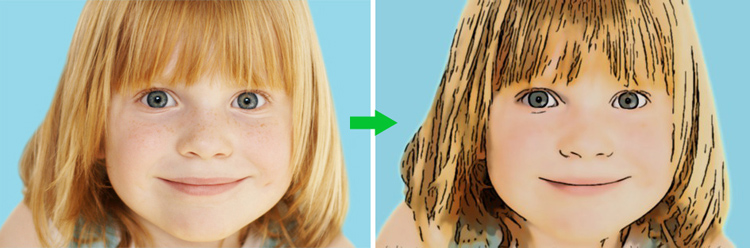
Cartoon girl
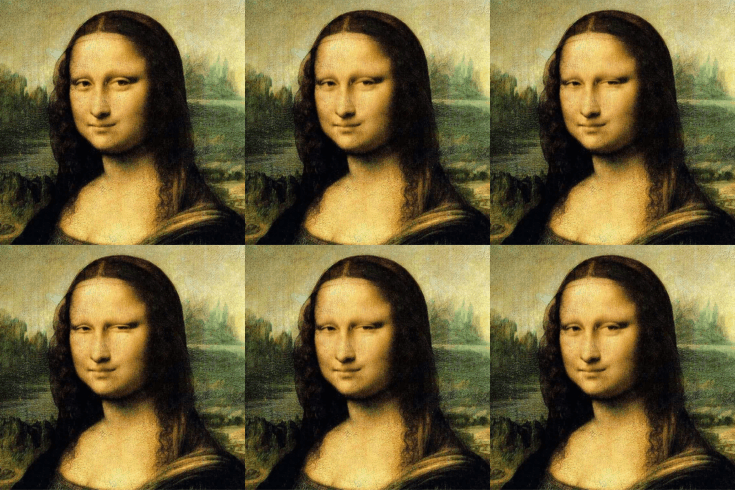
Mona Lisa photo

First of all upload your photo to Cartoon.Pho.to. You can either choose to upload it from disk or via URL if the image already exists somewhere on the Internet.

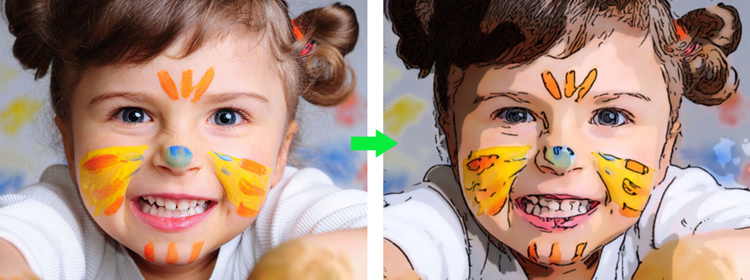
When the image is uploaded, the cartoon filter is applied to it by default. Here is an example:

Funny Girl Cartoon

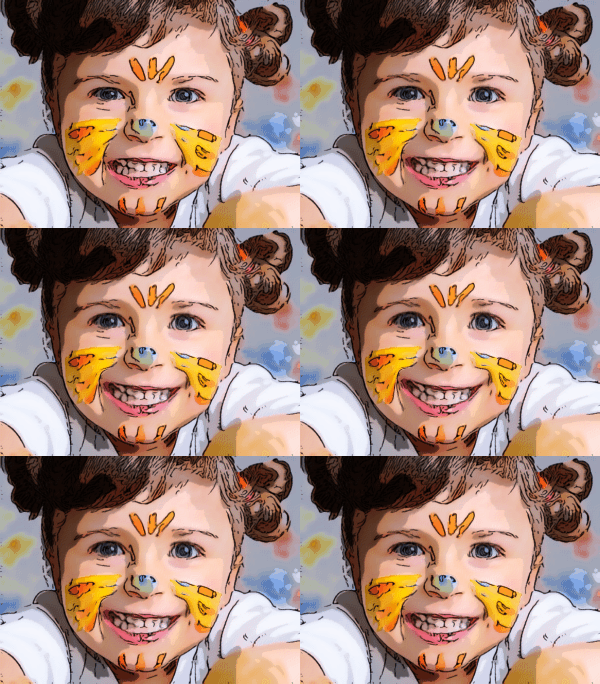
At this point you get access to face morphing options that enable you to create animated photo caricatures from face photos. Just check the ‘Face morphing’ box and you will see the list of available emotions. Meanwhile a ‘Smile’ already appears on the face:

Girl Smile Cartoon

Move further and you will be able to make a person flirt, wink or raise eyebrows in surprise!
Continue reading Fun with faces and cartoons

Visage Lab is going Android!

It has been a while since we announced the launch of the portrait enhancement app Visage Lab for iPhone and iPad users. From now on it is Android fans’ turn to experiment with all the face retouching algorithms, artistic filters and effects it has to offer.

Visage Lab on Googlr Play

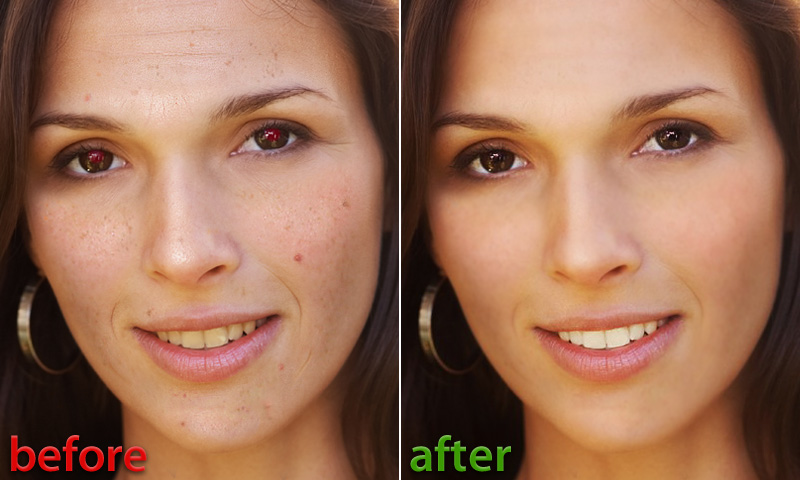
Visage Lab is a portrait retouching app aimed to automatically boost a photo, e.g. to remove pimples and wrinkles, outline the eyes and whiten the teeth within seconds. You can apply all the improvements at once or exclude some options you think unnecessary.

Visage Lab for Android - before and after face retouch

But Visage Lab functionality doesn’t end there and after the groundwork (we mean the enhancement) is done you will be offered to add a bunch of artistic effects to your picture. Divided into four groups, they allow you to change the background, experiment with styles or play with lighting and colors.

Android users can enjoy both Free and PRO versions. The PRO version is ad-free, contains more effects and filters and doesn’t add watermarks to your photos.

Turn your photo into a picture-perfect portrait with the help of Visage Lab high-quality retouch and picturesque effects.

Cartoon Face – a new name for the ‘AR Pho.to Cartoonizer’ app

Cartoon Face app for iPhone and iPad

Our amazing ‘AR Pho.to Cartoonizer’ app for iOS is now available under a new name – Cartoon Face! The app now also sports a new catchy logo and better looking interface. Besides, we have fixed the crash bug.

Check out the new interface on the screenshots below (Taylor Swift is flirting with you, but try to focus on the interface):

 Cartoon Face app for iOs Cartoon Face app for iOS - choose photo from albums of from Camera Cartoon Face app emotions

Get Cartoon Face on your iPhone, iPad or iPod touch for FREE and convert your photos into cartoons in real time and animate faces with realistic emotions!

Scan the QR code below to quickly install the app:
Cartoon Face qrcode

Hurry up to buy ‘Pho.to Lab PRO’ for iPhone/iPad with discount prices!

1024_pro We will stop selling Pho.to Lab PRO and Pho.to Lab PRO HD with discounted price in the near future.
It’s up to you whether to buy Pho.to Lab PRO for $1.99 ($2.99) or $3.99 ($5.99).
Make your decision now!


1 2

P.S. PRO version of the Pho.to Lab app has a bunch of premium effects, including Stylized effects, beautiful Backgrounds, funny Caricatures and cool Human-to-animal montages. Plus the PRO version has no ads or watermarks.